
Add a Custom Search Bar on the Top Bar
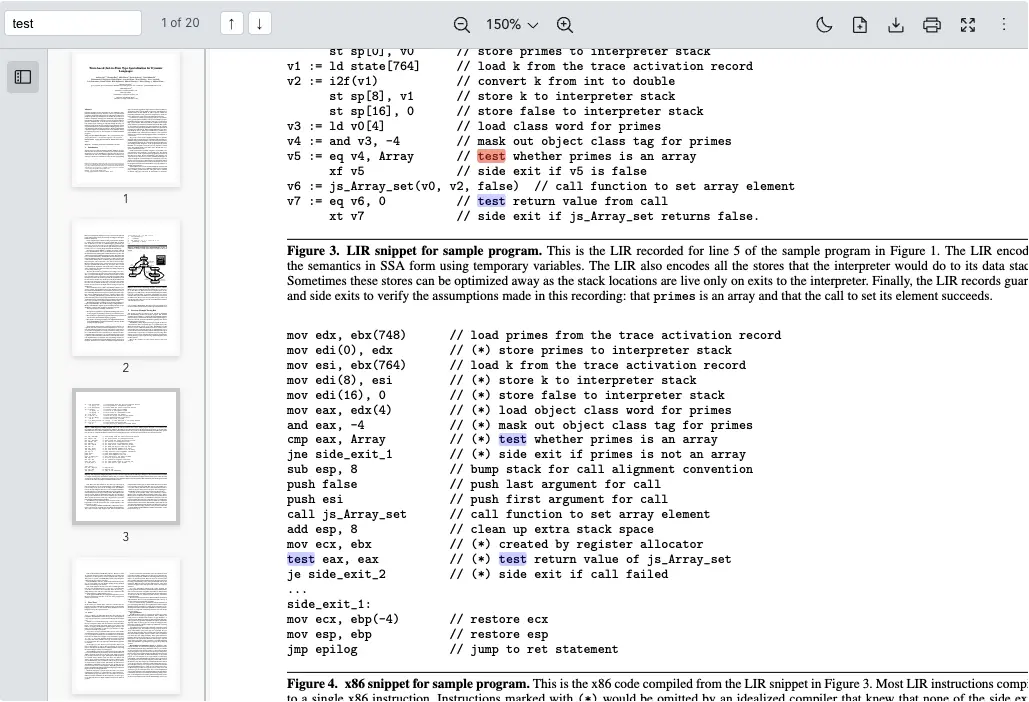
Scenario
Some applications need a search bar on the toolbar of a Vue PDF Component instead of inside a side panel. In this example, we replace the default page-navigation cluster with a custom debounced search bar so users can:
- Type a keyword and have the search fire automatically (debounced)
- See how many matches were found and which one they are currently on
- Navigate through matches with previous or next buttons
What to Use
Use the navigatable flag of toolbarOptions to hide the built-in navigation cluster and integrate the custom search using the searchControl from the Instance API on Vue PDF Viewer.
| Name | Objective |
|---|---|
navigatable | Hide the default page-navigation cluster so the custom bar can take its place |
search | Run a text search whenever the debounced input fires |
searching | Show a loading indicator while a search is in progress |
searchMatches | Read the total number of matches for the current query |
nextSearchMatch | Jump to the next match when the user clicks Next |
prevSearchMatch | Jump to the previous match when the user clicks Previous |
Code example
vue
<!-- Script -->
<script setup lang="ts">
import { computed, onBeforeUnmount, ref, watch } from "vue";
import { VPdfViewer } from "@vue-pdf-viewer/viewer";

// Type of the search control object
type SearchControl = {
  search: (value: string) => void;
  nextSearchMatch: () => void;
  prevSearchMatch: () => void;
  searching?: boolean;
  searchMatches?: {
    totalMatches: number;
    matches: Array<{ index: number; page: number }>;
  };
};

const SEARCH_DEBOUNCE_MS = 300;

const toolbarOptions = { navigatable: false } as const;
const pdfViewerRef = ref<InstanceType<typeof VPdfViewer>>();
const searchKeyword = ref("");
const currentMatchIndex = ref(0);

// Return the search control object
const searchControl = computed(
  () => pdfViewerRef.value?.searchControl as SearchControl | undefined
);
// Return the searching state
const isSearching = computed(() => searchControl.value?.searching ?? false);
// Return the total number of matches for the current query
const totalMatches = computed(
  () => searchControl.value?.searchMatches?.totalMatches ?? 0
);

// Debounce keyword input so we don't trigger a search on every keystroke
let debounceTimer: ReturnType<typeof setTimeout> | null = null;

watch(searchKeyword, (value) => {
  if (debounceTimer) clearTimeout(debounceTimer);
  debounceTimer = setTimeout(() => {
    const trimmed = value.trim();
    searchControl.value?.search(trimmed);
    // Reset the visible counter to the first match (or hide it when empty)
    currentMatchIndex.value = trimmed ? 1 : 0;
  }, SEARCH_DEBOUNCE_MS);
});

onBeforeUnmount(() => {
  if (debounceTimer) clearTimeout(debounceTimer);
});

const goToPrevMatch = () => {
  if (totalMatches.value === 0) return;
  searchControl.value?.prevSearchMatch();
  currentMatchIndex.value =
    currentMatchIndex.value <= 1
      ? totalMatches.value
      : currentMatchIndex.value - 1;
};

const goToNextMatch = () => {
  if (totalMatches.value === 0) return;
  searchControl.value?.nextSearchMatch();
  currentMatchIndex.value =
    currentMatchIndex.value >= totalMatches.value
      ? 1
      : currentMatchIndex.value + 1;
};
</script>

<!-- Template -->
<template>
  <div id="vpv">
    <div class="pdf-viewer-wrapper">
      <!-- PDF Viewer -->
      <VPdfViewer
        ref="pdfViewerRef"
        src="https://raw.githubusercontent.com/mozilla/pdf.js/ba2edeae/web/compressed.tracemonkey-pldi-09.pdf"
        :toolbar-options="toolbarOptions"
      />

      <!-- Custom Search Bar on the Top Bar -->
      <div class="pdf-custom-search-bar">
        <input
          v-model="searchKeyword"
          type="text"
          class="pdf-custom-search-input"
          placeholder="Search..."
        />

        <span v-if="isSearching" class="pdf-custom-search-status">
          Searching...
        </span>
        <span
          v-else-if="totalMatches > 0"
          class="pdf-custom-search-status"
        >
          {{ currentMatchIndex }} of {{ totalMatches }}
        </span>
        <span
          v-else-if="searchKeyword.trim()"
          class="pdf-custom-search-status"
        >
          No matches
        </span>

        <button
          type="button"
          class="pdf-custom-search-nav-btn"
          :disabled="totalMatches === 0"
          title="Previous match"
          @click="goToPrevMatch"
        >
          ↑
        </button>
        <button
          type="button"
          class="pdf-custom-search-nav-btn"
          :disabled="totalMatches === 0"
          title="Next match"
          @click="goToNextMatch"
        >
          ↓
        </button>
      </div>
    </div>
  </div>
</template>

<!-- Style -->
<style scoped>
#vpv {
  width: 100%;
  height: 700px;
  margin: 0 auto;
}

.pdf-viewer-wrapper {
  position: relative;
  width: 100%;
  height: 100%;
}

/* Sit inline with the top toolbar where the default navigation cluster used to be */
.pdf-custom-search-bar {
  position: absolute;
  top: 6px;
  left: 0;
  z-index: 15;
  display: flex;
  align-items: center;
  gap: 4px;
  height: 32px;
  padding: 0 4px;
  background: transparent;
}

.pdf-custom-search-input {
  width: 120px;
  height: 24px;
  border: 1px solid #cbd5e1;
  border-radius: 4px;
  padding: 0 8px;
  background: #fff;
  font-size: 13px;
  outline: none;
}

.pdf-custom-search-input:focus {
  border-color: #2563eb;
}

.pdf-custom-search-status {
  font-size: 12px;
  color: #475569;
  min-width: 70px;
  text-align: center;
}

.pdf-custom-search-nav-btn {
  width: 24px;
  height: 24px;
  border: 1px solid #d1d5db;
  border-radius: 4px;
  background: #fff;
  font-size: 12px;
  cursor: pointer;
}

.pdf-custom-search-nav-btn:hover:not(:disabled) {
  background: #f3f4f6;
}

.pdf-custom-search-nav-btn:disabled {
  opacity: 0.4;
  cursor: not-allowed;
}
</style>
vue
<!-- Script -->
<script setup>
import { computed, onBeforeUnmount, ref, watch } from "vue";
import { VPdfViewer } from "@vue-pdf-viewer/viewer";

const SEARCH_DEBOUNCE_MS = 300;

const toolbarOptions = { navigatable: false, searchable: false };
const pdfViewerRef = ref(null);
const searchKeyword = ref("");
const currentMatchIndex = ref(0);

// Return the search control object
const searchControl = computed(() => pdfViewerRef.value?.searchControl);
// Return the searching state
const isSearching = computed(() => searchControl.value?.searching ?? false);
// Return the total number of matches for the current query
const totalMatches = computed(
  () => searchControl.value?.searchMatches?.totalMatches ?? 0
);

// Debounce keyword input so we don't trigger a search on every keystroke
let debounceTimer = null;

watch(searchKeyword, (value) => {
  if (debounceTimer) clearTimeout(debounceTimer);
  debounceTimer = setTimeout(() => {
    const trimmed = value.trim();
    searchControl.value?.search(trimmed);
    // Reset the visible counter to the first match (or hide it when empty)
    currentMatchIndex.value = trimmed ? 1 : 0;
  }, SEARCH_DEBOUNCE_MS);
});

onBeforeUnmount(() => {
  if (debounceTimer) clearTimeout(debounceTimer);
});

const goToPrevMatch = () => {
  if (totalMatches.value === 0) return;
  searchControl.value?.prevSearchMatch();
  currentMatchIndex.value =
    currentMatchIndex.value <= 1
      ? totalMatches.value
      : currentMatchIndex.value - 1;
};

const goToNextMatch = () => {
  if (totalMatches.value === 0) return;
  searchControl.value?.nextSearchMatch();
  currentMatchIndex.value =
    currentMatchIndex.value >= totalMatches.value
      ? 1
      : currentMatchIndex.value + 1;
};
</script>

<!-- Template -->
<template>
  <div id="vpv">
    <div class="pdf-viewer-wrapper">
      <!-- PDF Viewer -->
      <VPdfViewer
        ref="pdfViewerRef"
        src="https://raw.githubusercontent.com/mozilla/pdf.js/ba2edeae/web/compressed.tracemonkey-pldi-09.pdf"
        :toolbar-options="toolbarOptions"
      />

      <!-- Custom Search Bar on the Top Bar -->
      <div class="pdf-custom-search-bar">
        <input
          v-model="searchKeyword"
          type="text"
          class="pdf-custom-search-input"
          placeholder="Search..."
        />

        <span v-if="isSearching" class="pdf-custom-search-status">
          Searching...
        </span>
        <span
          v-else-if="totalMatches > 0"
          class="pdf-custom-search-status"
        >
          {{ currentMatchIndex }} of {{ totalMatches }}
        </span>
        <span
          v-else-if="searchKeyword.trim()"
          class="pdf-custom-search-status"
        >
          No matches
        </span>

        <button
          type="button"
          class="pdf-custom-search-nav-btn"
          :disabled="totalMatches === 0"
          title="Previous match"
          @click="goToPrevMatch"
        >
          ↑
        </button>
        <button
          type="button"
          class="pdf-custom-search-nav-btn"
          :disabled="totalMatches === 0"
          title="Next match"
          @click="goToNextMatch"
        >
          ↓
        </button>
      </div>
    </div>
  </div>
</template>

<!-- Style -->
<style scoped>
#vpv {
  width: 100%;
  height: 700px;
  margin: 0 auto;
}

.pdf-viewer-wrapper {
  position: relative;
  width: 100%;
  height: 100%;
}

/* Sit inline with the top toolbar where the default navigation cluster used to be */
.pdf-custom-search-bar {
  position: absolute;
  top: 6px;
  left: 0;
  z-index: 15;
  display: flex;
  align-items: center;
  gap: 4px;
  height: 32px;
  padding: 0 4px;
  background: transparent;
}

.pdf-custom-search-input {
  width: 120px;
  height: 24px;
  border: 1px solid #cbd5e1;
  border-radius: 4px;
  padding: 0 8px;
  background: #fff;
  font-size: 13px;
  outline: none;
}

.pdf-custom-search-input:focus {
  border-color: #2563eb;
}

.pdf-custom-search-status {
  font-size: 12px;
  color: #475569;
  min-width: 70px;
  text-align: center;
}

.pdf-custom-search-nav-btn {
  width: 24px;
  height: 24px;
  border: 1px solid #d1d5db;
  border-radius: 4px;
  background: #fff;
  font-size: 12px;
  cursor: pointer;
}

.pdf-custom-search-nav-btn:hover:not(:disabled) {
  background: #f3f4f6;
}

.pdf-custom-search-nav-btn:disabled {
  opacity: 0.4;
  cursor: not-allowed;
}
</style>
vue
<!-- Script -->
<script lang="ts">
import { computed, defineComponent, onBeforeUnmount, ref, watch } from "vue";
import { VPdfViewer } from "@vue-pdf-viewer/viewer";

// Type of the search control object
type SearchControl = {
  search: (value: string) => void;
  nextSearchMatch: () => void;
  prevSearchMatch: () => void;
  searching?: boolean;
  searchMatches?: {
    totalMatches: number;
    matches: Array<{ index: number; page: number }>;
  };
};

const SEARCH_DEBOUNCE_MS = 300;

export default defineComponent({
  components: {
    VPdfViewer,
  },
  setup() {
    const toolbarOptions = { navigatable: false } as const;
    const pdfViewerRef = ref<InstanceType<typeof VPdfViewer>>();
    const searchKeyword = ref("");
    const currentMatchIndex = ref(0);

    const searchControl = computed(
      () => pdfViewerRef.value?.searchControl as SearchControl | undefined
    );
    const isSearching = computed(() => searchControl.value?.searching ?? false);
    const totalMatches = computed(
      () => searchControl.value?.searchMatches?.totalMatches ?? 0
    );

    let debounceTimer: ReturnType<typeof setTimeout> | null = null;

    watch(searchKeyword, (value) => {
      if (debounceTimer) clearTimeout(debounceTimer);
      debounceTimer = setTimeout(() => {
        const trimmed = value.trim();
        searchControl.value?.search(trimmed);
        currentMatchIndex.value = trimmed ? 1 : 0;
      }, SEARCH_DEBOUNCE_MS);
    });

    onBeforeUnmount(() => {
      if (debounceTimer) clearTimeout(debounceTimer);
    });

    const goToPrevMatch = () => {
      if (totalMatches.value === 0) return;
      searchControl.value?.prevSearchMatch();
      currentMatchIndex.value =
        currentMatchIndex.value <= 1
          ? totalMatches.value
          : currentMatchIndex.value - 1;
    };

    const goToNextMatch = () => {
      if (totalMatches.value === 0) return;
      searchControl.value?.nextSearchMatch();
      currentMatchIndex.value =
        currentMatchIndex.value >= totalMatches.value
          ? 1
          : currentMatchIndex.value + 1;
    };

    return {
      toolbarOptions,
      pdfViewerRef,
      searchKeyword,
      currentMatchIndex,
      isSearching,
      totalMatches,
      goToPrevMatch,
      goToNextMatch,
    };
  },
});
</script>

<!-- Template -->
<template>
  <div id="vpv">
    <div class="pdf-viewer-wrapper">
      <!-- PDF Viewer -->
      <VPdfViewer
        ref="pdfViewerRef"
        src="https://raw.githubusercontent.com/mozilla/pdf.js/ba2edeae/web/compressed.tracemonkey-pldi-09.pdf"
        :toolbar-options="toolbarOptions"
      />

      <!-- Custom Search Bar on the Top Bar -->
      <div class="pdf-custom-search-bar">
        <input
          v-model="searchKeyword"
          type="text"
          class="pdf-custom-search-input"
          placeholder="Search..."
        />

        <span v-if="isSearching" class="pdf-custom-search-status">
          Searching...
        </span>
        <span
          v-else-if="totalMatches > 0"
          class="pdf-custom-search-status"
        >
          {{ currentMatchIndex }} of {{ totalMatches }}
        </span>
        <span
          v-else-if="searchKeyword.trim()"
          class="pdf-custom-search-status"
        >
          No matches
        </span>

        <button
          type="button"
          class="pdf-custom-search-nav-btn"
          :disabled="totalMatches === 0"
          title="Previous match"
          @click="goToPrevMatch"
        >
          ↑
        </button>
        <button
          type="button"
          class="pdf-custom-search-nav-btn"
          :disabled="totalMatches === 0"
          title="Next match"
          @click="goToNextMatch"
        >
          ↓
        </button>
      </div>
    </div>
  </div>
</template>

<!-- Style -->
<style scoped>
#vpv {
  width: 100%;
  height: 700px;
  margin: 0 auto;
}

.pdf-viewer-wrapper {
  position: relative;
  width: 100%;
  height: 100%;
}

/* Sit inline with the top toolbar where the default navigation cluster used to be */
.pdf-custom-search-bar {
  position: absolute;
  top: 6px;
  left: 0;
  z-index: 15;
  display: flex;
  align-items: center;
  gap: 4px;
  height: 32px;
  padding: 0 4px;
  background: transparent;
}

.pdf-custom-search-input {
  width: 120px;
  height: 24px;
  border: 1px solid #cbd5e1;
  border-radius: 4px;
  padding: 0 8px;
  background: #fff;
  font-size: 13px;
  outline: none;
}

.pdf-custom-search-input:focus {
  border-color: #2563eb;
}

.pdf-custom-search-status {
  font-size: 12px;
  color: #475569;
  min-width: 70px;
  text-align: center;
}

.pdf-custom-search-nav-btn {
  width: 24px;
  height: 24px;
  border: 1px solid #d1d5db;
  border-radius: 4px;
  background: #fff;
  font-size: 12px;
  cursor: pointer;
}

.pdf-custom-search-nav-btn:hover:not(:disabled) {
  background: #f3f4f6;
}

.pdf-custom-search-nav-btn:disabled {
  opacity: 0.4;
  cursor: not-allowed;
}
</style>
vue
<!-- Script -->
<script>
import { computed, defineComponent, onBeforeUnmount, ref, watch } from "vue";
import { VPdfViewer } from "@vue-pdf-viewer/viewer";

const SEARCH_DEBOUNCE_MS = 300;

export default defineComponent({
  components: {
    VPdfViewer,
  },
  setup() {
    const toolbarOptions = { navigatable: false };
    const pdfViewerRef = ref(null);
    const searchKeyword = ref("");
    const currentMatchIndex = ref(0);

    const searchControl = computed(() => pdfViewerRef.value?.searchControl);
    const isSearching = computed(() => searchControl.value?.searching ?? false);
    const totalMatches = computed(
      () => searchControl.value?.searchMatches?.totalMatches ?? 0
    );

    let debounceTimer = null;

    watch(searchKeyword, (value) => {
      if (debounceTimer) clearTimeout(debounceTimer);
      debounceTimer = setTimeout(() => {
        const trimmed = value.trim();
        searchControl.value?.search(trimmed);
        currentMatchIndex.value = trimmed ? 1 : 0;
      }, SEARCH_DEBOUNCE_MS);
    });

    onBeforeUnmount(() => {
      if (debounceTimer) clearTimeout(debounceTimer);
    });

    const goToPrevMatch = () => {
      if (totalMatches.value === 0) return;
      searchControl.value?.prevSearchMatch();
      currentMatchIndex.value =
        currentMatchIndex.value <= 1
          ? totalMatches.value
          : currentMatchIndex.value - 1;
    };

    const goToNextMatch = () => {
      if (totalMatches.value === 0) return;
      searchControl.value?.nextSearchMatch();
      currentMatchIndex.value =
        currentMatchIndex.value >= totalMatches.value
          ? 1
          : currentMatchIndex.value + 1;
    };

    return {
      toolbarOptions,
      pdfViewerRef,
      searchKeyword,
      currentMatchIndex,
      isSearching,
      totalMatches,
      goToPrevMatch,
      goToNextMatch,
    };
  },
});
</script>

<!-- Template -->
<template>
  <div id="vpv">
    <div class="pdf-viewer-wrapper">
      <!-- PDF Viewer -->
      <VPdfViewer
        ref="pdfViewerRef"
        src="https://raw.githubusercontent.com/mozilla/pdf.js/ba2edeae/web/compressed.tracemonkey-pldi-09.pdf"
        :toolbar-options="toolbarOptions"
      />

      <!-- Custom Search Bar on the Top Bar -->
      <div class="pdf-custom-search-bar">
        <input
          v-model="searchKeyword"
          type="text"
          class="pdf-custom-search-input"
          placeholder="Search..."
        />

        <span v-if="isSearching" class="pdf-custom-search-status">
          Searching...
        </span>
        <span
          v-else-if="totalMatches > 0"
          class="pdf-custom-search-status"
        >
          {{ currentMatchIndex }} of {{ totalMatches }}
        </span>
        <span
          v-else-if="searchKeyword.trim()"
          class="pdf-custom-search-status"
        >
          No matches
        </span>

        <button
          type="button"
          class="pdf-custom-search-nav-btn"
          :disabled="totalMatches === 0"
          title="Previous match"
          @click="goToPrevMatch"
        >
          ↑
        </button>
        <button
          type="button"
          class="pdf-custom-search-nav-btn"
          :disabled="totalMatches === 0"
          title="Next match"
          @click="goToNextMatch"
        >
          ↓
        </button>
      </div>
    </div>
  </div>
</template>

<!-- Style -->
<style scoped>
#vpv {
  width: 100%;
  height: 700px;
  margin: 0 auto;
}

.pdf-viewer-wrapper {
  position: relative;
  width: 100%;
  height: 100%;
}

/* Sit inline with the top toolbar where the default navigation cluster used to be */
.pdf-custom-search-bar {
  position: absolute;
  top: 6px;
  left: 0;
  z-index: 15;
  display: flex;
  align-items: center;
  gap: 4px;
  height: 32px;
  padding: 0 4px;
  background: transparent;
}

.pdf-custom-search-input {
  width: 120px;
  height: 24px;
  border: 1px solid #cbd5e1;
  border-radius: 4px;
  padding: 0 8px;
  background: #fff;
  font-size: 13px;
  outline: none;
}

.pdf-custom-search-input:focus {
  border-color: #2563eb;
}

.pdf-custom-search-status {
  font-size: 12px;
  color: #475569;
  min-width: 70px;
  text-align: center;
}

.pdf-custom-search-nav-btn {
  width: 24px;
  height: 24px;
  border: 1px solid #d1d5db;
  border-radius: 4px;
  background: #fff;
  font-size: 12px;
  cursor: pointer;
}

.pdf-custom-search-nav-btn:hover:not(:disabled) {
  background: #f3f4f6;
}

.pdf-custom-search-nav-btn:disabled {
  opacity: 0.4;
  cursor: not-allowed;
}
</style>