
Build Your Own Toolbar with PrimeVue Framework
This guide walks through building a custom PDF viewer toolbar with PrimeVue and @vue-pdf-viewer/viewer. You can integrate PrimeVue in two ways:
- Build with PrimeVue using the default toolbar - Use the built-in toolbar from
VPdfViewer, control which tools are visible withtoolbar-options, and replace default toolbar icons through viewer slots with PrimeIcons. - Build with PrimeVue using Instance API - Build a full custom toolbar UI and connect each action (zoom, pagination, search, print, download) through the
VPdfViewerinstance controls.
Build with PrimeVue using the default toolbar
The default toolbar layout and behavior are already provided by @vue-pdf-viewer/viewer. Use this approach when you want a fast setup with the default viewer experience, but still want branding and icon consistency with PrimeVue.
Step 1: Define constants and configure toolbar-options
Create your component and define:
- a page title,
- the PDF source URL
- and a
TOOLBAR_OPTIONSobject typed withToolbarOptions.
Then pass TOOLBAR_OPTIONS to VPdfViewer through :toolbar-options to control which default tools appear.
In this setup:
- Enabled: Search, page navigation, zoom, print, download
- Disabled: Sidebar, theme switch, fullscreen, rotate, thumbnail, and other advanced tools
This keeps the toolbar compact and focused on common reading actions.
<script setup lang="ts">
import { VPdfViewer, type ToolbarOptions } from "@vue-pdf-viewer/viewer";

const TITLE = "Build with PrimeVue using the default toolbar";
const DEFAULT_PDF_URL =
  "https://raw.githubusercontent.com/mozilla/pdf.js/ba2edeae/web/compressed.tracemonkey-pldi-09.pdf";

// Keep only common reading tools and hide advanced controls.
const TOOLBAR_OPTIONS: ToolbarOptions = {
  sidebarEnable: false,
  themeSwitchable: false,
  printable: true,
  fullscreen: false,
  downloadable: true,
  newFileOpenable: false,
  searchable: true,
  navigatable: true,
  zoomable: true,
  thumbnailViewable: false,
  rotatable: false,
  docPropertiesEnabled: false,
  pointerSwitchable: false,
  jumpNavigatable: false,
  scrollingSwitchable: false,
  pageViewSwitchable: false,
  commentPanelEnabled: false,
};
</script><script setup>
import { VPdfViewer } from "@vue-pdf-viewer/viewer";
const TITLE = "Build with PrimeVue using the default toolbar";
const DEFAULT_PDF_URL =
"https://raw.githubusercontent.com/mozilla/pdf.js/ba2edeae/web/compressed.tracemonkey-pldi-09.pdf";
// Keep only common reading tools and hide advanced controls.
const TOOLBAR_OPTIONS = {
sidebarEnable: false,
themeSwitchable: false,
printable: true,
fullscreen: false,
downloadable: true,
newFileOpenable: false,
searchable: true,
navigatable: true,
zoomable: true,
thumbnailViewable: false,
rotatable: false,
docPropertiesEnabled: false,
pointerSwitchable: false,
jumpNavigatable: false,
scrollingSwitchable: false,
pageViewSwitchable: false,
commentPanelEnabled: false,
};
</script><script lang="ts">
import { defineComponent } from "vue";
import { VPdfViewer, type ToolbarOptions } from "@vue-pdf-viewer/viewer";
export default defineComponent({
name: "CustomizeDefaultToolbar",
components: { VPdfViewer },
data() {
return {
TITLE: "Build with PrimeVue using the default toolbar",
DEFAULT_PDF_URL:
"https://raw.githubusercontent.com/mozilla/pdf.js/ba2edeae/web/compressed.tracemonkey-pldi-09.pdf",
// Keep only common reading tools and hide advanced controls.
TOOLBAR_OPTIONS: {
sidebarEnable: false,
themeSwitchable: false,
printable: true,
fullscreen: false,
downloadable: true,
newFileOpenable: false,
searchable: true,
navigatable: true,
zoomable: true,
thumbnailViewable: false,
rotatable: false,
docPropertiesEnabled: false,
pointerSwitchable: false,
jumpNavigatable: false,
scrollingSwitchable: false,
pageViewSwitchable: false,
commentPanelEnabled: false,
} as ToolbarOptions,
};
},
});
</script><script>
import { VPdfViewer } from "@vue-pdf-viewer/viewer";
export default {
name: "CustomizeDefaultToolbar",
components: { VPdfViewer },
data() {
return {
TITLE: "Build with PrimeVue using the default toolbar",
DEFAULT_PDF_URL:
"https://raw.githubusercontent.com/mozilla/pdf.js/ba2edeae/web/compressed.tracemonkey-pldi-09.pdf",
// Keep only common reading tools and hide advanced controls.
TOOLBAR_OPTIONS: {
sidebarEnable: false,
themeSwitchable: false,
printable: true,
fullscreen: false,
downloadable: true,
newFileOpenable: false,
searchable: true,
navigatable: true,
zoomable: true,
thumbnailViewable: false,
rotatable: false,
docPropertiesEnabled: false,
pointerSwitchable: false,
jumpNavigatable: false,
scrollingSwitchable: false,
pageViewSwitchable: false,
commentPanelEnabled: false,
},
};
},
};
</script>Step 2: Override default toolbar icons with PrimeIcons slots
Use icon slots to swap the default viewer icons with PrimeIcons.
Each slot corresponds to one built-in toolbar action.
<template>
  <h1>{{ TITLE }}</h1>

  <!-- Replace default viewer icons with PrimeIcons via toolbar slots. -->
  <VPdfViewer :src="DEFAULT_PDF_URL" :toolbar-options="TOOLBAR_OPTIONS">
    <template #iconSearch>
      <i class="pi pi-search toolbar-icon" />
    </template>
    <template #iconPrevPage><i class="pi pi-angle-up toolbar-icon" /></template>
    <template #iconNextPage
      ><i class="pi pi-angle-down toolbar-icon"
    /></template>
    <template #iconZoomOut
      ><i class="pi pi-search-minus toolbar-icon"
    /></template>
    <template #iconZoomIn
      ><i class="pi pi-search-plus toolbar-icon"
    /></template>
    <template #iconDownload><i class="pi pi-download toolbar-icon" /></template>
    <template #iconPrint><i class="pi pi-print toolbar-icon" /></template>
  </VPdfViewer>
</template>
Step 3: Apply PrimeVue theme color to toolbar icons
Add scoped styles so your icon color follows the active PrimeVue theme token:
<style scoped>
/* Use PrimeVue design tokens so icon color follows active theme/preset. */
.toolbar-icon {
  color: var(--p-primary-color);
}
</style>
This keeps toolbar visuals aligned with the rest of your PrimeVue design system.
Step 4: Put it together in one component
You can keep the full implementation in a single Vue SFC (Single File Component):
<script setup lang="ts">
import { VPdfViewer, type ToolbarOptions } from "@vue-pdf-viewer/viewer";

const TITLE = "Build with PrimeVue using the default toolbar";
const DEFAULT_PDF_URL =
  "https://raw.githubusercontent.com/mozilla/pdf.js/ba2edeae/web/compressed.tracemonkey-pldi-09.pdf";

// Keep only common reading tools and hide advanced controls.
const TOOLBAR_OPTIONS: ToolbarOptions = {
  sidebarEnable: false,
  themeSwitchable: false,
  printable: true,
  fullscreen: false,
  downloadable: true,
  newFileOpenable: false,
  searchable: true,
  navigatable: true,
  zoomable: true,
  thumbnailViewable: false,
  rotatable: false,
  docPropertiesEnabled: false,
  pointerSwitchable: false,
  jumpNavigatable: false,
  scrollingSwitchable: false,
  pageViewSwitchable: false,
  commentPanelEnabled: false,
};
</script><script setup>
import { VPdfViewer } from "@vue-pdf-viewer/viewer";
const TITLE = "Build with PrimeVue using the default toolbar";
const DEFAULT_PDF_URL =
"https://raw.githubusercontent.com/mozilla/pdf.js/ba2edeae/web/compressed.tracemonkey-pldi-09.pdf";
// Keep only common reading tools and hide advanced controls.
const TOOLBAR_OPTIONS = {
sidebarEnable: false,
themeSwitchable: false,
printable: true,
fullscreen: false,
downloadable: true,
newFileOpenable: false,
searchable: true,
navigatable: true,
zoomable: true,
thumbnailViewable: false,
rotatable: false,
docPropertiesEnabled: false,
pointerSwitchable: false,
jumpNavigatable: false,
scrollingSwitchable: false,
pageViewSwitchable: false,
commentPanelEnabled: false,
};
</script><script lang="ts">
import { defineComponent } from "vue";
import { VPdfViewer, type ToolbarOptions } from "@vue-pdf-viewer/viewer";
export default defineComponent({
name: "CustomizeDefaultToolbar",
components: { VPdfViewer },
data() {
return {
TITLE: "Build with PrimeVue using the default toolbar",
DEFAULT_PDF_URL:
"https://raw.githubusercontent.com/mozilla/pdf.js/ba2edeae/web/compressed.tracemonkey-pldi-09.pdf",
// Keep only common reading tools and hide advanced controls.
TOOLBAR_OPTIONS: {
sidebarEnable: false,
themeSwitchable: false,
printable: true,
fullscreen: false,
downloadable: true,
newFileOpenable: false,
searchable: true,
navigatable: true,
zoomable: true,
thumbnailViewable: false,
rotatable: false,
docPropertiesEnabled: false,
pointerSwitchable: false,
jumpNavigatable: false,
scrollingSwitchable: false,
pageViewSwitchable: false,
commentPanelEnabled: false,
} as ToolbarOptions,
};
},
});
</script><script>
import { VPdfViewer } from "@vue-pdf-viewer/viewer";
export default {
name: "CustomizeDefaultToolbar",
components: { VPdfViewer },
data() {
return {
TITLE: "Build with PrimeVue using the default toolbar",
DEFAULT_PDF_URL:
"https://raw.githubusercontent.com/mozilla/pdf.js/ba2edeae/web/compressed.tracemonkey-pldi-09.pdf",
// Keep only common reading tools and hide advanced controls.
TOOLBAR_OPTIONS: {
sidebarEnable: false,
themeSwitchable: false,
printable: true,
fullscreen: false,
downloadable: true,
newFileOpenable: false,
searchable: true,
navigatable: true,
zoomable: true,
thumbnailViewable: false,
rotatable: false,
docPropertiesEnabled: false,
pointerSwitchable: false,
jumpNavigatable: false,
scrollingSwitchable: false,
pageViewSwitchable: false,
commentPanelEnabled: false,
},
};
},
};
</script><template>
<h1>{{ TITLE }}</h1>
<!-- Replace default viewer icons with PrimeIcons via toolbar slots. -->
<VPdfViewer :src="DEFAULT_PDF_URL" :toolbar-options="TOOLBAR_OPTIONS">
<template #iconSearch><i class="pi pi-search toolbar-icon" /></template>
<template #iconPrevPage><i class="pi pi-angle-up toolbar-icon" /></template>
<template #iconNextPage
><i class="pi pi-angle-down toolbar-icon"
/></template>
<template #iconZoomOut
><i class="pi pi-search-minus toolbar-icon"
/></template>
<template #iconZoomIn
><i class="pi pi-search-plus toolbar-icon"
/></template>
<template #iconDownload><i class="pi pi-download toolbar-icon" /></template>
<template #iconPrint><i class="pi pi-print toolbar-icon" /></template>
</VPdfViewer>
</template>
<style scoped>
/* Use PrimeVue design tokens so icon color follows active theme/preset. */
.toolbar-icon {
color: var(--p-primary-color);
}
</style>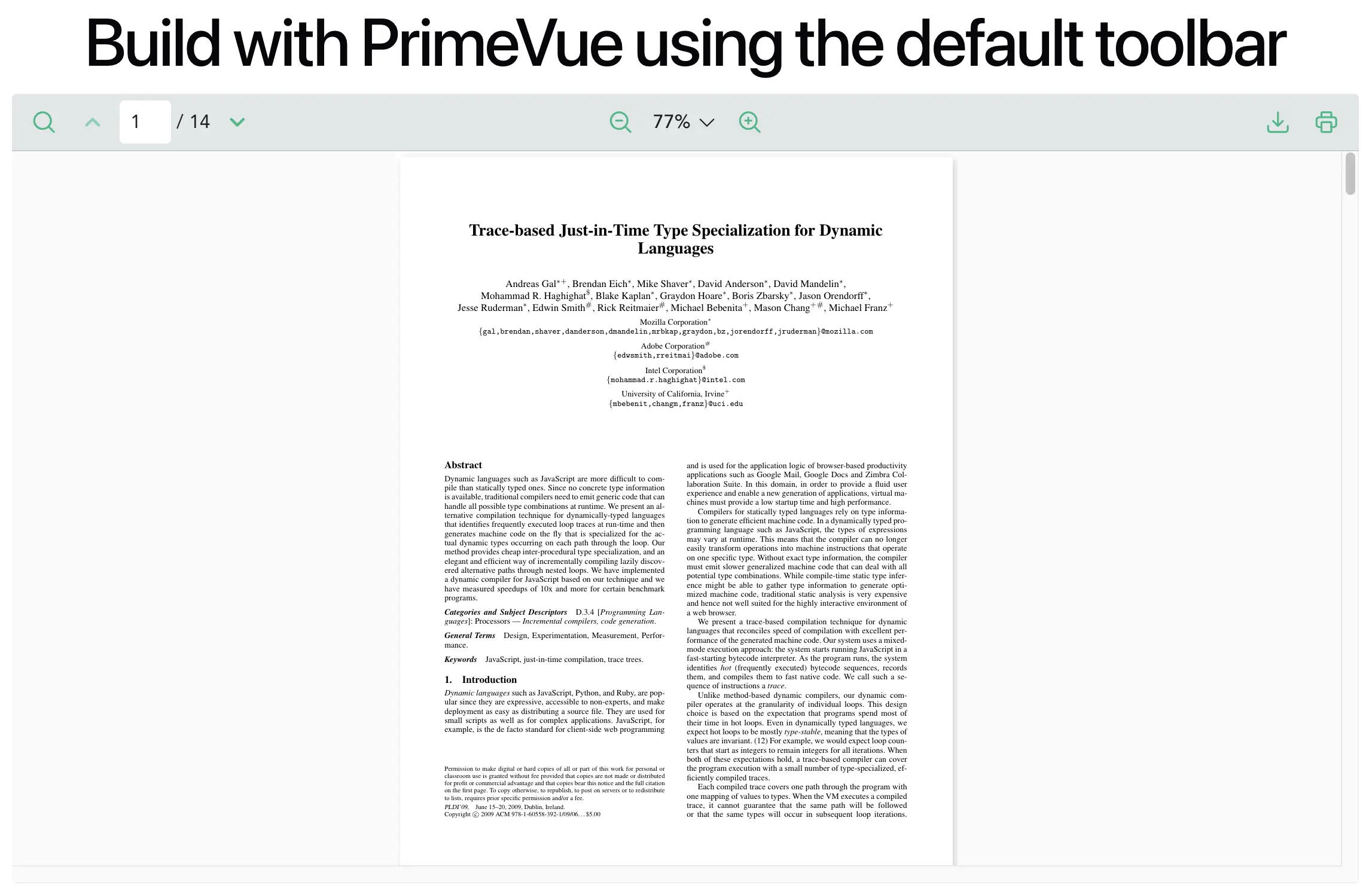
Notes
- Keep the default toolbar when you only need visibility control and icon customization.
- Override only icon slots to match PrimeVue style while preserving built-in behavior.
Build with PrimeVue using Instance API
This approach builds the entire toolbar yourself and controls the Vue PDF component through VPdfViewer instance APIs.
Instance controls to use
The Instance API version relies on these controls from VPdfViewer:
| Toolbar feature | Instance control | Objective |
|---|---|---|
| Zoom | zoomControl | Manage zoom level state and update the viewer scale. |
| Pagination | pageControl | Track current or total pages and perform page navigation. |
| Search | searchControl | Execute keyword search and navigate match results. |
printControl | Start or cancel print flow and report print lifecycle events. | |
| Download | downloadControl | Trigger file download and report download completion or failure. |
Step 1: Create the viewer ref and control accessors
Use a ref for VPdfViewer and expose each control variable with computed values.
<script setup lang="ts">
import { computed, ref } from "vue";
import { VPdfViewer } from "@vue-pdf-viewer/viewer";

const TITLE = "Build with PrimeVue using Instance API";
const DEFAULT_PDF_URL =
  "https://raw.githubusercontent.com/mozilla/pdf.js/ba2edeae/web/compressed.tracemonkey-pldi-09.pdf";
// Store the VPdfViewer instance to access its control APIs.
const vpvRef = ref<InstanceType<typeof VPdfViewer>>();

const zoomControl = computed(() => vpvRef.value?.zoomControl);
const pageControl = computed(() => vpvRef.value?.pageControl);
const searchControl = computed(() => vpvRef.value?.searchControl);
const printControl = computed(() => vpvRef.value?.printControl);
const downloadControl = computed(() => vpvRef.value?.downloadControl);
</script><script setup>
import { computed, ref } from "vue";
import { VPdfViewer } from "@vue-pdf-viewer/viewer";
const TITLE = "Build with PrimeVue using Instance API";
const DEFAULT_PDF_URL =
"https://raw.githubusercontent.com/mozilla/pdf.js/ba2edeae/web/compressed.tracemonkey-pldi-09.pdf";
// Store the VPdfViewer instance to access its control APIs.
const vpvRef = ref();
const zoomControl = computed(() => vpvRef.value?.zoomControl);
const pageControl = computed(() => vpvRef.value?.pageControl);
const searchControl = computed(() => vpvRef.value?.searchControl);
const printControl = computed(() => vpvRef.value?.printControl);
const downloadControl = computed(() => vpvRef.value?.downloadControl);
</script><script lang="ts">
import { defineComponent } from "vue";
import { VPdfViewer } from "@vue-pdf-viewer/viewer";
export default defineComponent({
name: "CreateYourOwnToolbar",
components: { VPdfViewer },
data() {
return {
TITLE: "Build with PrimeVue using Instance API",
DEFAULT_PDF_URL:
"https://raw.githubusercontent.com/mozilla/pdf.js/ba2edeae/web/compressed.tracemonkey-pldi-09.pdf",
// Set in template ref; used by computed controls below.
vpvRef: null as InstanceType<typeof VPdfViewer> | null,
};
},
computed: {
zoomControl() {
return this.vpvRef?.zoomControl;
},
pageControl() {
return this.vpvRef?.pageControl;
},
searchControl() {
return this.vpvRef?.searchControl;
},
printControl() {
return this.vpvRef?.printControl;
},
downloadControl() {
return this.vpvRef?.downloadControl;
},
},
});
</script><script>
import { VPdfViewer } from "@vue-pdf-viewer/viewer";
export default {
name: "CreateYourOwnToolbar",
components: { VPdfViewer },
data() {
return {
TITLE: "Build with PrimeVue using Instance API",
DEFAULT_PDF_URL:
"https://raw.githubusercontent.com/mozilla/pdf.js/ba2edeae/web/compressed.tracemonkey-pldi-09.pdf",
// Set in template ref; used by computed controls below.
vpvRef: null,
};
},
computed: {
zoomControl() {
return this.vpvRef?.zoomControl;
},
pageControl() {
return this.vpvRef?.pageControl;
},
searchControl() {
return this.vpvRef?.searchControl;
},
printControl() {
return this.vpvRef?.printControl;
},
downloadControl() {
return this.vpvRef?.downloadControl;
},
},
};
</script>Step 2: Implement zoom and pagination logic
Control zoom, previous or next page, and direct page input from instance APIs.
<script setup lang="ts">
import { computed, unref } from "vue";
import { type ZoomLevel } from "@vue-pdf-viewer/viewer";

const currentScale = computed(() => zoomControl.value?.scale);
const currentPageInput = computed(() => pageControl.value?.currentPage);

const handleZoomTool = (type: "in" | "out") => {
  const zoomCtrl = unref(zoomControl);
  if (!zoomCtrl) return;
  const scale = unref(currentScale);

  // Use incremental zoom steps for in/out toolbar actions.
  if (type === "in") scale && zoomCtrl.zoom(scale + 0.25);
  else if (type === "out") scale && zoomCtrl.zoom(scale - 0.25);
  else zoomCtrl.zoom(type as ZoomLevel);
};

const prevPage = () => {
  if (pageControl.value?.currentPage === 1) return;
  pageControl.value?.goToPage((pageControl.value?.currentPage ?? 1) - 1);
};

const nextPage = () => {
  if (pageControl.value?.currentPage === pageControl.value?.totalPages) return;
  pageControl.value?.goToPage((pageControl.value?.currentPage ?? 1) + 1);
};

const handlePageInput = (page: number) => {
  pageControl.value?.goToPage(page);
};

const handleKeyPress = (event: KeyboardEvent) => {
  if (event.key === "Enter") {
    handlePageInput(Number((event.target as HTMLInputElement).value));
  }
};

const isNextPageButtonDisable = computed(
  () => pageControl.value?.currentPage === pageControl.value?.totalPages,
);

const isPreviousPageButtonDisable = computed(
  () => pageControl.value?.currentPage === 1,
);
</script><script setup>
import { computed, unref } from "vue";
const currentScale = computed(() => zoomControl.value?.scale);
const currentPageInput = computed(() => pageControl.value?.currentPage);
const handleZoomTool = (type) => {
const zoomCtrl = unref(zoomControl);
if (!zoomCtrl) return;
const scale = unref(currentScale);
// Use incremental zoom steps for in/out toolbar actions.
if (type === "in") scale && zoomCtrl.zoom(scale + 0.25);
else if (type === "out") scale && zoomCtrl.zoom(scale - 0.25);
};
const prevPage = () => {
if (pageControl.value?.currentPage === 1) return;
pageControl.value?.goToPage((pageControl.value?.currentPage ?? 1) - 1);
};
const nextPage = () => {
if (pageControl.value?.currentPage === pageControl.value?.totalPages) return;
pageControl.value?.goToPage((pageControl.value?.currentPage ?? 1) + 1);
};
const handlePageInput = (page) => pageControl.value?.goToPage(page);
const handleKeyPress = (event) => {
if (event.key === "Enter") handlePageInput(Number(event.target.value));
};
const isNextPageButtonDisable = computed(
() => pageControl.value?.currentPage === pageControl.value?.totalPages,
);
const isPreviousPageButtonDisable = computed(
() => pageControl.value?.currentPage === 1,
);
</script><script lang="ts">
import { defineComponent } from "vue";
export default defineComponent({
computed: {
currentScale(): number | undefined {
return this.zoomControl?.scale;
},
currentPageInput(): number | undefined {
return this.pageControl?.currentPage;
},
isNextPageButtonDisable(): boolean {
return this.pageControl?.currentPage === this.pageControl?.totalPages;
},
isPreviousPageButtonDisable(): boolean {
return this.pageControl?.currentPage === 1;
},
},
methods: {
handleZoomTool(type: "in" | "out") {
if (!this.zoomControl || !this.currentScale) return;
// Keep zoom movement consistent with toolbar controls.
this.zoomControl.zoom(
type === "in" ? this.currentScale + 0.25 : this.currentScale - 0.25,
);
},
prevPage() {
if (this.pageControl?.currentPage === 1) return;
this.pageControl?.goToPage((this.pageControl?.currentPage ?? 1) - 1);
},
nextPage() {
if (this.pageControl?.currentPage === this.pageControl?.totalPages)
return;
this.pageControl?.goToPage((this.pageControl?.currentPage ?? 1) + 1);
},
handlePageInput(page: number) {
this.pageControl?.goToPage(page);
},
handleKeyPress(event: KeyboardEvent) {
if (event.key === "Enter")
this.handlePageInput(Number((event.target as HTMLInputElement).value));
},
},
});
</script><script>
export default {
computed: {
currentScale() {
return this.zoomControl?.scale;
},
currentPageInput() {
return this.pageControl?.currentPage;
},
isNextPageButtonDisable() {
return this.pageControl?.currentPage === this.pageControl?.totalPages;
},
isPreviousPageButtonDisable() {
return this.pageControl?.currentPage === 1;
},
},
methods: {
handleZoomTool(type) {
if (!this.zoomControl || !this.currentScale) return;
// Keep zoom movement consistent with toolbar controls.
this.zoomControl.zoom(
type === "in" ? this.currentScale + 0.25 : this.currentScale - 0.25,
);
},
prevPage() {
if (this.pageControl?.currentPage === 1) return;
this.pageControl?.goToPage((this.pageControl?.currentPage ?? 1) - 1);
},
nextPage() {
if (this.pageControl?.currentPage === this.pageControl?.totalPages)
return;
this.pageControl?.goToPage((this.pageControl?.currentPage ?? 1) + 1);
},
handlePageInput(page) {
this.pageControl?.goToPage(page);
},
handleKeyPress(event) {
if (event.key === "Enter")
this.handlePageInput(Number(event.target.value));
},
},
};
</script>Step 3: Implement search keyword and result navigation
Create a search state (searchKeyword, current match index, total matches) and wire input and previous or next match actions.
<script setup lang="ts">
import { computed, ref, unref, watch } from "vue";

const searchKeyword = ref("");
const currentSearchMatchIndex = ref(0);
const totalMatches = computed(
  () => searchControl?.value?.searchMatches?.totalMatches,
);

const searchMatchLabel = computed(() => {
  const total = totalMatches.value ?? 0;
  if (!total) return "0/0";
  return `${currentSearchMatchIndex.value}/${total}`;
});

const isSearchNavDisabled = computed(() => (totalMatches.value ?? 0) === 0);

const handleSearchInput = () => {
  const searchCtrl = unref(searchControl);
  if (!searchCtrl) return;
  const keyword = searchKeyword.value.trim();
  searchCtrl.search(keyword);
  if (!keyword) currentSearchMatchIndex.value = 0;
};

const selectNextSearchMatch = () => {
  const searchCtrl = unref(searchControl);
  const total = totalMatches.value ?? 0;
  if (!searchCtrl || !total) return;
  searchCtrl.nextSearchMatch();

  if (
    !currentSearchMatchIndex.value ||
    currentSearchMatchIndex.value >= total
  ) {
    currentSearchMatchIndex.value = 1;
    return;
  }
  currentSearchMatchIndex.value += 1;
};

const selectPrevSearchMatch = () => {
  const searchCtrl = unref(searchControl);
  const total = totalMatches.value ?? 0;
  if (!searchCtrl || !total) return;
  searchCtrl.prevSearchMatch();

  if (!currentSearchMatchIndex.value || currentSearchMatchIndex.value <= 1) {
    currentSearchMatchIndex.value = total;
    return;
  }
  currentSearchMatchIndex.value -= 1;
};

// Keep "current/total" label stable as matches update.
watch(totalMatches, (total) => {
  const normalizedTotal = total ?? 0;
  if (!normalizedTotal) {
    currentSearchMatchIndex.value = 0;
    return;
  }
  if (!currentSearchMatchIndex.value) {
    currentSearchMatchIndex.value = 1;
    return;
  }
  if (currentSearchMatchIndex.value > normalizedTotal) {
    currentSearchMatchIndex.value = normalizedTotal;
  }
});
</script><script setup>
import { computed, ref, unref, watch } from "vue";
const searchKeyword = ref("");
const currentSearchMatchIndex = ref(0);
const totalMatches = computed(
() => searchControl?.value?.searchMatches?.totalMatches,
);
const searchMatchLabel = computed(() => {
const total = totalMatches.value ?? 0;
return total ? `${currentSearchMatchIndex.value}/${total}` : "0/0";
});
const isSearchNavDisabled = computed(() => (totalMatches.value ?? 0) === 0);
const handleSearchInput = () => {
const searchCtrl = unref(searchControl);
if (!searchCtrl) return;
const keyword = searchKeyword.value.trim();
searchCtrl.search(keyword);
if (!keyword) currentSearchMatchIndex.value = 0;
};
const selectNextSearchMatch = () => {
const searchCtrl = unref(searchControl);
const total = totalMatches.value ?? 0;
if (!searchCtrl || !total) return;
searchCtrl.nextSearchMatch();
currentSearchMatchIndex.value =
!currentSearchMatchIndex.value || currentSearchMatchIndex.value >= total
? 1
: currentSearchMatchIndex.value + 1;
};
const selectPrevSearchMatch = () => {
const searchCtrl = unref(searchControl);
const total = totalMatches.value ?? 0;
if (!searchCtrl || !total) return;
searchCtrl.prevSearchMatch();
currentSearchMatchIndex.value =
!currentSearchMatchIndex.value || currentSearchMatchIndex.value <= 1
? total
: currentSearchMatchIndex.value - 1;
};
// Keep "current/total" label stable as matches update.
watch(totalMatches, (total) => {
const normalizedTotal = total ?? 0;
if (!normalizedTotal) currentSearchMatchIndex.value = 0;
else if (!currentSearchMatchIndex.value) currentSearchMatchIndex.value = 1;
else if (currentSearchMatchIndex.value > normalizedTotal)
currentSearchMatchIndex.value = normalizedTotal;
});
</script><script lang="ts">
import { defineComponent } from "vue";
export default defineComponent({
data() {
return { searchKeyword: "", currentSearchMatchIndex: 0 };
},
computed: {
totalMatches(): number {
return this.searchControl?.searchMatches?.totalMatches ?? 0;
},
searchMatchLabel(): string {
return this.totalMatches
? `${this.currentSearchMatchIndex}/${this.totalMatches}`
: "0/0";
},
isSearchNavDisabled(): boolean {
return this.totalMatches === 0;
},
},
watch: {
// Normalize current index whenever match count changes.
totalMatches(total: number) {
if (!total) this.currentSearchMatchIndex = 0;
else if (!this.currentSearchMatchIndex) this.currentSearchMatchIndex = 1;
else if (this.currentSearchMatchIndex > total)
this.currentSearchMatchIndex = total;
},
},
methods: {
handleSearchInput() {
if (!this.searchControl) return;
const keyword = this.searchKeyword.trim();
this.searchControl.search(keyword);
if (!keyword) this.currentSearchMatchIndex = 0;
},
selectNextSearchMatch() {
if (!this.searchControl || !this.totalMatches) return;
this.searchControl.nextSearchMatch();
this.currentSearchMatchIndex =
!this.currentSearchMatchIndex ||
this.currentSearchMatchIndex >= this.totalMatches
? 1
: this.currentSearchMatchIndex + 1;
},
selectPrevSearchMatch() {
if (!this.searchControl || !this.totalMatches) return;
this.searchControl.prevSearchMatch();
this.currentSearchMatchIndex =
!this.currentSearchMatchIndex || this.currentSearchMatchIndex <= 1
? this.totalMatches
: this.currentSearchMatchIndex - 1;
},
},
});
</script><script>
export default {
data() {
return { searchKeyword: "", currentSearchMatchIndex: 0 };
},
computed: {
totalMatches() {
return this.searchControl?.searchMatches?.totalMatches ?? 0;
},
searchMatchLabel() {
return this.totalMatches
? `${this.currentSearchMatchIndex}/${this.totalMatches}`
: "0/0";
},
isSearchNavDisabled() {
return this.totalMatches === 0;
},
},
watch: {
// Normalize current index whenever match count changes.
totalMatches(total) {
if (!total) this.currentSearchMatchIndex = 0;
else if (!this.currentSearchMatchIndex) this.currentSearchMatchIndex = 1;
else if (this.currentSearchMatchIndex > total)
this.currentSearchMatchIndex = total;
},
},
methods: {
handleSearchInput() {
if (!this.searchControl) return;
const keyword = this.searchKeyword.trim();
this.searchControl.search(keyword);
if (!keyword) this.currentSearchMatchIndex = 0;
},
selectNextSearchMatch() {
if (!this.searchControl || !this.totalMatches) return;
this.searchControl.nextSearchMatch();
this.currentSearchMatchIndex =
!this.currentSearchMatchIndex ||
this.currentSearchMatchIndex >= this.totalMatches
? 1
: this.currentSearchMatchIndex + 1;
},
selectPrevSearchMatch() {
if (!this.searchControl || !this.totalMatches) return;
this.searchControl.prevSearchMatch();
this.currentSearchMatchIndex =
!this.currentSearchMatchIndex || this.currentSearchMatchIndex <= 1
? this.totalMatches
: this.currentSearchMatchIndex - 1;
},
},
};
</script>Step 4: Add print and download handlers
Use printControl and downloadControl from the instance and register optional callbacks.
<script setup lang="ts">
import { unref, watch } from "vue";

const handlePrintTool = () => {
  const printCtrl = unref(printControl);
  if (!printCtrl) return;
  printCtrl.print({ visibleDefaultProgress: true });
};

const cancelPrint = () => {
  const printCtrl = unref(printControl);
  if (!printCtrl) return;
  printCtrl.cancel();
};

// Attach print lifecycle callbacks when control becomes available.
watch(printControl, (printCtrl) => {
  if (!printCtrl) return;

  printCtrl.onProgress = (progress: any) => {
    console.log("Print progress", progress.percentage, progress.loadedPages);
  };

  printCtrl.onError = (error: any) => {
    console.log("Print error", error);
    cancelPrint();
  };

  printCtrl.onComplete = () => {
    console.log("Print completed");
  };
});

const handleDownloadFile = () => {
  const downloadCtrl = unref(downloadControl);
  if (!downloadCtrl) return;
  downloadCtrl.download();
};

// Attach download callbacks for success/error feedback.
watch(downloadControl, (downloadCtrl) => {
  if (!downloadCtrl) return;

  downloadCtrl.onError = (error: any) => {
    console.log("Download error", error);
  };

  downloadCtrl.onComplete = () => {
    console.log("Download completed");
  };
});
</script><script setup>
import { unref, watch } from "vue";
const handlePrintTool = () => {
const printCtrl = unref(printControl);
if (!printCtrl) return;
printCtrl.print({ visibleDefaultProgress: true });
};
const cancelPrint = () => {
const printCtrl = unref(printControl);
if (!printCtrl) return;
printCtrl.cancel();
};
// Attach print lifecycle callbacks when control becomes available.
watch(printControl, (printCtrl) => {
if (!printCtrl) return;
printCtrl.onProgress = (progress) =>
console.log("Print progress", progress.percentage, progress.loadedPages);
printCtrl.onError = (error) => {
console.log("Print error", error);
cancelPrint();
};
printCtrl.onComplete = () => console.log("Print completed");
});
const handleDownloadFile = () => {
const downloadCtrl = unref(downloadControl);
if (!downloadCtrl) return;
downloadCtrl.download();
};
// Attach download callbacks for success/error feedback.
watch(downloadControl, (downloadCtrl) => {
if (!downloadCtrl) return;
downloadCtrl.onError = (error) => console.log("Download error", error);
downloadCtrl.onComplete = () => console.log("Download completed");
});
</script><script lang="ts">
import { defineComponent } from "vue";
export default defineComponent({
methods: {
handlePrintTool() {
this.printControl?.print({ visibleDefaultProgress: true });
},
cancelPrint() {
this.printControl?.cancel();
},
handleDownloadFile() {
this.downloadControl?.download();
},
},
watch: {
// Attach print lifecycle callbacks when control becomes available.
printControl(printCtrl: any) {
if (!printCtrl) return;
printCtrl.onProgress = (progress: any) =>
console.log(
"Print progress",
progress.percentage,
progress.loadedPages,
);
printCtrl.onError = (error: any) => {
console.log("Print error", error);
this.cancelPrint();
};
printCtrl.onComplete = () => console.log("Print completed");
},
// Attach download callbacks for success/error feedback.
downloadControl(downloadCtrl: any) {
if (!downloadCtrl) return;
downloadCtrl.onError = (error: any) =>
console.log("Download error", error);
downloadCtrl.onComplete = () => console.log("Download completed");
},
},
});
</script><script>
export default {
methods: {
handlePrintTool() {
this.printControl?.print({ visibleDefaultProgress: true });
},
cancelPrint() {
this.printControl?.cancel();
},
handleDownloadFile() {
this.downloadControl?.download();
},
},
watch: {
// Attach print lifecycle callbacks when control becomes available.
printControl(printCtrl) {
if (!printCtrl) return;
printCtrl.onProgress = (progress) =>
console.log(
"Print progress",
progress.percentage,
progress.loadedPages,
);
printCtrl.onError = (error) => {
console.log("Print error", error);
this.cancelPrint();
};
printCtrl.onComplete = () => console.log("Print completed");
},
// Attach download callbacks for success/error feedback.
downloadControl(downloadCtrl) {
if (!downloadCtrl) return;
downloadCtrl.onError = (error) => console.log("Download error", error);
downloadCtrl.onComplete = () => console.log("Download completed");
},
},
};
</script>Step 5: Build the custom toolbar template and disable default toolbar
First, render your own PrimeVue-style toolbar. Then disable the built-in toolbar by passing :toolbar-options="false".
<template>
  <h1>{{ TITLE }}</h1>

  <div class="py-2 px-2">
    <div
      class="flex md:flex-row flex-col gap-4 justify-self-center w-full items-center justify-between"
    >
      <!-- custom toolbar buttons and search UI -->
    </div>
  </div>

  <!-- Disable default toolbar because this component renders a custom one. -->
  <VPdfViewer ref="vpvRef" :src="DEFAULT_PDF_URL" :toolbar-options="false" />
</template>
Step 6: Add scoped styles for toolbar and search UI
Use PrimeVue theme tokens so the toolbar follows your active theme.
<style scoped>
/* PrimeVue token-based styles so colors adapt to active theme. */
.toolbar-container {
  background-color: var(--p-primary-100);
  color: var(--p-primary-color);
  border-color: var(--p-primary-200);
}
.toolbar-btn:hover:not(:disabled) {
  background-color: var(--p-highlight-background);
}
.search-toolbar {
  margin-left: 0.5rem;
  display: flex;
  align-items: center;
  gap: 0.75rem;
}
.search-input-wrap {
  display: flex;
  align-items: center;
  gap: 0.75rem;
  width: 16rem;
  height: 2.2rem;
  border-radius: 0.6rem;
  padding: 0 0.6rem;
  border: 1px solid var(--p-content-border-color);
  background-color: var(--p-content-background);
}
.search-icon {
  color: var(--p-text-muted-color);
  font-size: 0.9rem;
}
.search-input {
  width: 100%;
  border: none;
  outline: none;
  background-color: transparent;
  color: var(--p-text-color);
  font-size: 0.8rem;
  font-weight: 600;
}
.search-input::placeholder {
  color: var(--p-text-muted-color);
}
.search-counter {
  min-width: 2rem;
  color: var(--p-text-color);
  font-size: 0.95rem;
  font-weight: 600;
  line-height: 1;
}
.search-nav-btn {
  cursor: pointer;
  border: none;
  background: transparent;
  color: var(--p-text-muted-color);
  font-size: 1rem;
  line-height: 1;
  border-radius: 0.3rem;
  padding: 0.125rem;
  transition:
    background-color 0.2s ease,
    color 0.2s ease;
}
.search-nav-btn:hover:not(:disabled) {
  color: var(--p-text-color);
  background-color: var(--p-highlight-background);
}
.search-nav-btn:disabled {
  cursor: not-allowed;
  opacity: 0.45;
}
</style>
Step 7: Complete Example
This complete example combines all previous steps into one component: instance control setup, toolbar actions, search navigation, custom PrimeVue UI, and scoped styling.
<script setup lang="ts">
import { computed, ref, unref, watch } from "vue";
import { VPdfViewer, type ZoomLevel } from "@vue-pdf-viewer/viewer";

const TITLE = "Build with PrimeVue using Instance API";
const DEFAULT_PDF_URL =
  "https://raw.githubusercontent.com/mozilla/pdf.js/ba2edeae/web/compressed.tracemonkey-pldi-09.pdf";
// Main viewer instance; every control is derived from this ref.
const vpvRef = ref<InstanceType<typeof VPdfViewer>>();

const zoomControl = computed(() => vpvRef.value?.zoomControl);
const pageControl = computed(() => vpvRef.value?.pageControl);
const searchControl = computed(() => vpvRef.value?.searchControl);
const printControl = computed(() => vpvRef.value?.printControl);
const downloadControl = computed(() => vpvRef.value?.downloadControl);
const currentScale = computed(() => zoomControl.value?.scale);
const currentPageInput = computed(() => pageControl.value?.currentPage);

const searchKeyword = ref("");
const currentSearchMatchIndex = ref(0);
const totalMatches = computed(
  () => searchControl.value?.searchMatches?.totalMatches,
);
const searchMatchLabel = computed(() =>
  totalMatches.value
    ? `${currentSearchMatchIndex.value}/${totalMatches.value}`
    : "0/0",
);
const isSearchNavDisabled = computed(() => (totalMatches.value ?? 0) === 0);
const isNextPageButtonDisable = computed(
  () => pageControl.value?.currentPage === pageControl.value?.totalPages,
);
const isPreviousPageButtonDisable = computed(
  () => pageControl.value?.currentPage === 1,
);

const handleZoomTool = (type: "in" | "out") => {
  const zoomCtrl = unref(zoomControl);
  if (!zoomCtrl) return;
  const scale = unref(currentScale);
  if (!scale) return;
  zoomCtrl.zoom(type === "in" ? scale + 0.25 : scale - 0.25);
};

const prevPage = () => {
  if (pageControl.value?.currentPage === 1) return;
  pageControl.value?.goToPage((pageControl.value?.currentPage ?? 1) - 1);
};
const nextPage = () => {
  if (pageControl.value?.currentPage === pageControl.value?.totalPages) return;
  pageControl.value?.goToPage((pageControl.value?.currentPage ?? 1) + 1);
};
const handlePageInput = (page: number) => pageControl.value?.goToPage(page);
const handleKeyPress = (event: KeyboardEvent) => {
  if (event.key === "Enter")
    handlePageInput(Number((event.target as HTMLInputElement).value));
};

const handleSearchInput = () => {
  const ctrl = unref(searchControl);
  if (!ctrl) return;
  const keyword = searchKeyword.value.trim();
  ctrl.search(keyword);
  if (!keyword) currentSearchMatchIndex.value = 0;
};
const selectNextSearchMatch = () => {
  const ctrl = unref(searchControl);
  const total = totalMatches.value ?? 0;
  if (!ctrl || !total) return;
  ctrl.nextSearchMatch();
  currentSearchMatchIndex.value =
    !currentSearchMatchIndex.value || currentSearchMatchIndex.value >= total
      ? 1
      : currentSearchMatchIndex.value + 1;
};
const selectPrevSearchMatch = () => {
  const ctrl = unref(searchControl);
  const total = totalMatches.value ?? 0;
  if (!ctrl || !total) return;
  ctrl.prevSearchMatch();
  currentSearchMatchIndex.value =
    !currentSearchMatchIndex.value || currentSearchMatchIndex.value <= 1
      ? total
      : currentSearchMatchIndex.value - 1;
};
// Keep current index valid when result count changes after each search.
watch(totalMatches, (total) => {
  const value = total ?? 0;
  if (!value) currentSearchMatchIndex.value = 0;
  else if (!currentSearchMatchIndex.value) currentSearchMatchIndex.value = 1;
  else if (currentSearchMatchIndex.value > value)
    currentSearchMatchIndex.value = value;
});

const handlePrintTool = () =>
  printControl.value?.print({ visibleDefaultProgress: true });
const cancelPrint = () => printControl.value?.cancel();
// Register print lifecycle callbacks once printControl is ready.
watch(printControl, (ctrl) => {
  if (!ctrl) return;
  ctrl.onProgress = (progress: any) =>
    console.log("Print progress", progress.percentage, progress.loadedPages);
  ctrl.onError = (error: any) => {
    console.log("Print error", error);
    cancelPrint();
  };
  ctrl.onComplete = () => console.log("Print completed");
});

const handleDownloadFile = () => downloadControl.value?.download();
// Register download lifecycle callbacks once downloadControl is ready.
watch(downloadControl, (ctrl) => {
  if (!ctrl) return;
  ctrl.onError = (error: any) => console.log("Download error", error);
  ctrl.onComplete = () => console.log("Download completed");
});
</script><script setup>
import { computed, ref, unref, watch } from "vue";
import { VPdfViewer } from "@vue-pdf-viewer/viewer";
const TITLE = "Build with PrimeVue using Instance API";
const DEFAULT_PDF_URL =
"https://raw.githubusercontent.com/mozilla/pdf.js/ba2edeae/web/compressed.tracemonkey-pldi-09.pdf";
// Main viewer instance; every control is derived from this ref.
const vpvRef = ref();
const zoomControl = computed(() => vpvRef.value?.zoomControl);
const pageControl = computed(() => vpvRef.value?.pageControl);
const searchControl = computed(() => vpvRef.value?.searchControl);
const printControl = computed(() => vpvRef.value?.printControl);
const downloadControl = computed(() => vpvRef.value?.downloadControl);
const currentScale = computed(() => zoomControl.value?.scale);
const currentPageInput = computed(() => pageControl.value?.currentPage);
const searchKeyword = ref("");
const currentSearchMatchIndex = ref(0);
const totalMatches = computed(
() => searchControl.value?.searchMatches?.totalMatches,
);
const searchMatchLabel = computed(() =>
totalMatches.value
? `${currentSearchMatchIndex.value}/${totalMatches.value}`
: "0/0",
);
const isSearchNavDisabled = computed(() => (totalMatches.value ?? 0) === 0);
const isNextPageButtonDisable = computed(
() => pageControl.value?.currentPage === pageControl.value?.totalPages,
);
const isPreviousPageButtonDisable = computed(
() => pageControl.value?.currentPage === 1,
);
const handleZoomTool = (type) => {
const zoomCtrl = unref(zoomControl);
if (!zoomCtrl) return;
const scale = unref(currentScale);
if (!scale) return;
zoomCtrl.zoom(type === "in" ? scale + 0.25 : scale - 0.25);
};
const prevPage = () => {
if (pageControl.value?.currentPage === 1) return;
pageControl.value?.goToPage((pageControl.value?.currentPage ?? 1) - 1);
};
const nextPage = () => {
if (pageControl.value?.currentPage === pageControl.value?.totalPages) return;
pageControl.value?.goToPage((pageControl.value?.currentPage ?? 1) + 1);
};
const handlePageInput = (page) => pageControl.value?.goToPage(page);
const handleKeyPress = (event) => {
if (event.key === "Enter") handlePageInput(Number(event.target.value));
};
const handleSearchInput = () => {
const ctrl = unref(searchControl);
if (!ctrl) return;
const keyword = searchKeyword.value.trim();
ctrl.search(keyword);
if (!keyword) currentSearchMatchIndex.value = 0;
};
const selectNextSearchMatch = () => {
const ctrl = unref(searchControl);
const total = totalMatches.value ?? 0;
if (!ctrl || !total) return;
ctrl.nextSearchMatch();
currentSearchMatchIndex.value =
!currentSearchMatchIndex.value || currentSearchMatchIndex.value >= total
? 1
: currentSearchMatchIndex.value + 1;
};
const selectPrevSearchMatch = () => {
const ctrl = unref(searchControl);
const total = totalMatches.value ?? 0;
if (!ctrl || !total) return;
ctrl.prevSearchMatch();
currentSearchMatchIndex.value =
!currentSearchMatchIndex.value || currentSearchMatchIndex.value <= 1
? total
: currentSearchMatchIndex.value - 1;
};
// Keep current index valid when result count changes after each search.
watch(totalMatches, (total) => {
const value = total ?? 0;
if (!value) currentSearchMatchIndex.value = 0;
else if (!currentSearchMatchIndex.value) currentSearchMatchIndex.value = 1;
else if (currentSearchMatchIndex.value > value)
currentSearchMatchIndex.value = value;
});
const handlePrintTool = () =>
printControl.value?.print({ visibleDefaultProgress: true });
const cancelPrint = () => printControl.value?.cancel();
// Register print lifecycle callbacks once printControl is ready.
watch(printControl, (ctrl) => {
if (!ctrl) return;
ctrl.onProgress = (progress) =>
console.log("Print progress", progress.percentage, progress.loadedPages);
ctrl.onError = (error) => {
console.log("Print error", error);
cancelPrint();
};
ctrl.onComplete = () => console.log("Print completed");
});
const handleDownloadFile = () => downloadControl.value?.download();
// Register download lifecycle callbacks once downloadControl is ready.
watch(downloadControl, (ctrl) => {
if (!ctrl) return;
ctrl.onError = (error) => console.log("Download error", error);
ctrl.onComplete = () => console.log("Download completed");
});
</script><script lang="ts">
import { defineComponent } from "vue";
import { VPdfViewer } from "@vue-pdf-viewer/viewer";
export default defineComponent({
name: "CreateYourOwnToolbar",
components: { VPdfViewer },
data() {
return {
TITLE: "Build with PrimeVue using Instance API",
DEFAULT_PDF_URL:
"https://raw.githubusercontent.com/mozilla/pdf.js/ba2edeae/web/compressed.tracemonkey-pldi-09.pdf",
searchKeyword: "",
currentSearchMatchIndex: 0,
};
},
computed: {
// Pull controls from VPdfViewer ref so toolbar actions can call instance APIs.
zoomControl(): any {
return (this.$refs.vpvRef as any)?.zoomControl;
},
pageControl(): any {
return (this.$refs.vpvRef as any)?.pageControl;
},
searchControl(): any {
return (this.$refs.vpvRef as any)?.searchControl;
},
printControl(): any {
return (this.$refs.vpvRef as any)?.printControl;
},
downloadControl(): any {
return (this.$refs.vpvRef as any)?.downloadControl;
},
currentScale(): number | undefined {
return this.zoomControl?.scale;
},
currentPageInput: {
get(): number | undefined {
return this.pageControl?.currentPage;
},
set(value: number) {
this.pageControl?.goToPage(Number(value));
},
},
totalMatches(): number {
return this.searchControl?.searchMatches?.totalMatches ?? 0;
},
searchMatchLabel(): string {
return this.totalMatches
? `${this.currentSearchMatchIndex}/${this.totalMatches}`
: "0/0";
},
isSearchNavDisabled(): boolean {
return this.totalMatches === 0;
},
isNextPageButtonDisable(): boolean {
return this.pageControl?.currentPage === this.pageControl?.totalPages;
},
isPreviousPageButtonDisable(): boolean {
return this.pageControl?.currentPage === 1;
},
},
watch: {
// Keep current match index in sync with changing search results.
totalMatches(total: number) {
if (!total) this.currentSearchMatchIndex = 0;
else if (!this.currentSearchMatchIndex) this.currentSearchMatchIndex = 1;
else if (this.currentSearchMatchIndex > total)
this.currentSearchMatchIndex = total;
},
printControl(ctrl: any) {
if (!ctrl) return;
ctrl.onProgress = (progress: any) =>
console.log(
"Print progress",
progress.percentage,
progress.loadedPages,
);
ctrl.onError = (error: any) => {
console.log("Print error", error);
this.cancelPrint();
};
ctrl.onComplete = () => console.log("Print completed");
},
downloadControl(ctrl: any) {
if (!ctrl) return;
ctrl.onError = (error: any) => console.log("Download error", error);
ctrl.onComplete = () => console.log("Download completed");
},
},
methods: {
handleZoomTool(type: "in" | "out") {
if (this.currentScale)
this.zoomControl?.zoom(
type === "in" ? this.currentScale + 0.25 : this.currentScale - 0.25,
);
},
prevPage() {
if (this.pageControl?.currentPage !== 1)
this.pageControl?.goToPage(this.pageControl?.currentPage - 1);
},
nextPage() {
if (this.pageControl?.currentPage !== this.pageControl?.totalPages)
this.pageControl?.goToPage(this.pageControl?.currentPage + 1);
},
handleKeyPress(event: KeyboardEvent) {
if (event.key === "Enter")
this.pageControl?.goToPage(
Number((event.target as HTMLInputElement).value),
);
},
handleSearchInput() {
this.searchControl?.search(this.searchKeyword.trim());
if (!this.searchKeyword.trim()) this.currentSearchMatchIndex = 0;
},
selectNextSearchMatch() {
if (!this.totalMatches) return;
this.searchControl?.nextSearchMatch();
this.currentSearchMatchIndex =
!this.currentSearchMatchIndex ||
this.currentSearchMatchIndex >= this.totalMatches
? 1
: this.currentSearchMatchIndex + 1;
},
selectPrevSearchMatch() {
if (!this.totalMatches) return;
this.searchControl?.prevSearchMatch();
this.currentSearchMatchIndex =
!this.currentSearchMatchIndex || this.currentSearchMatchIndex <= 1
? this.totalMatches
: this.currentSearchMatchIndex - 1;
},
handlePrintTool() {
this.printControl?.print({ visibleDefaultProgress: true });
},
cancelPrint() {
this.printControl?.cancel();
},
handleDownloadFile() {
this.downloadControl?.download();
},
},
});
</script><script>
import { VPdfViewer } from "@vue-pdf-viewer/viewer";
export default {
name: "CreateYourOwnToolbar",
components: { VPdfViewer },
data() {
return {
TITLE: "Build with PrimeVue using Instance API",
DEFAULT_PDF_URL:
"https://raw.githubusercontent.com/mozilla/pdf.js/ba2edeae/web/compressed.tracemonkey-pldi-09.pdf",
searchKeyword: "",
currentSearchMatchIndex: 0,
};
},
computed: {
// Pull controls from VPdfViewer ref so toolbar actions can call instance APIs.
zoomControl() {
return this.$refs.vpvRef?.zoomControl;
},
pageControl() {
return this.$refs.vpvRef?.pageControl;
},
searchControl() {
return this.$refs.vpvRef?.searchControl;
},
printControl() {
return this.$refs.vpvRef?.printControl;
},
downloadControl() {
return this.$refs.vpvRef?.downloadControl;
},
currentScale() {
return this.zoomControl?.scale;
},
currentPageInput: {
get() {
return this.pageControl?.currentPage;
},
set(value) {
this.pageControl?.goToPage(Number(value));
},
},
totalMatches() {
return this.searchControl?.searchMatches?.totalMatches ?? 0;
},
searchMatchLabel() {
return this.totalMatches
? `${this.currentSearchMatchIndex}/${this.totalMatches}`
: "0/0";
},
isSearchNavDisabled() {
return this.totalMatches === 0;
},
isNextPageButtonDisable() {
return this.pageControl?.currentPage === this.pageControl?.totalPages;
},
isPreviousPageButtonDisable() {
return this.pageControl?.currentPage === 1;
},
},
watch: {
// Keep current match index in sync with changing search results.
totalMatches(total) {
if (!total) this.currentSearchMatchIndex = 0;
else if (!this.currentSearchMatchIndex) this.currentSearchMatchIndex = 1;
else if (this.currentSearchMatchIndex > total)
this.currentSearchMatchIndex = total;
},
printControl(ctrl) {
if (!ctrl) return;
ctrl.onProgress = (progress) =>
console.log(
"Print progress",
progress.percentage,
progress.loadedPages,
);
ctrl.onError = (error) => {
console.log("Print error", error);
this.cancelPrint();
};
ctrl.onComplete = () => console.log("Print completed");
},
downloadControl(ctrl) {
if (!ctrl) return;
ctrl.onError = (error) => console.log("Download error", error);
ctrl.onComplete = () => console.log("Download completed");
},
},
methods: {
handleZoomTool(type) {
if (this.currentScale)
this.zoomControl?.zoom(
type === "in" ? this.currentScale + 0.25 : this.currentScale - 0.25,
);
},
prevPage() {
if (this.pageControl?.currentPage !== 1)
this.pageControl?.goToPage(this.pageControl?.currentPage - 1);
},
nextPage() {
if (this.pageControl?.currentPage !== this.pageControl?.totalPages)
this.pageControl?.goToPage(this.pageControl?.currentPage + 1);
},
handleKeyPress(event) {
if (event.key === "Enter")
this.pageControl?.goToPage(Number(event.target.value));
},
handleSearchInput() {
this.searchControl?.search(this.searchKeyword.trim());
if (!this.searchKeyword.trim()) this.currentSearchMatchIndex = 0;
},
selectNextSearchMatch() {
if (!this.totalMatches) return;
this.searchControl?.nextSearchMatch();
this.currentSearchMatchIndex =
!this.currentSearchMatchIndex ||
this.currentSearchMatchIndex >= this.totalMatches
? 1
: this.currentSearchMatchIndex + 1;
},
selectPrevSearchMatch() {
if (!this.totalMatches) return;
this.searchControl?.prevSearchMatch();
this.currentSearchMatchIndex =
!this.currentSearchMatchIndex || this.currentSearchMatchIndex <= 1
? this.totalMatches
: this.currentSearchMatchIndex - 1;
},
handlePrintTool() {
this.printControl?.print({ visibleDefaultProgress: true });
},
cancelPrint() {
this.printControl?.cancel();
},
handleDownloadFile() {
this.downloadControl?.download();
},
},
};
</script><template>
<h1>{{ TITLE }}</h1>
<div class="py-2 px-2">
<div
class="flex md:flex-row flex-col gap-4 justify-self-center w-full items-center justify-between"
>
<div
class="toolbar-container flex w-fit items-center gap-4 rounded-lg border p-2 justify-center"
>
<button
class="toolbar-btn cursor-pointer rounded p-1 transition-colors disabled:cursor-not-allowed disabled:opacity-50"
@click="() => handleZoomTool('out')"
>
<i class="pi pi-search-minus"></i>
</button>
<button
class="toolbar-btn cursor-pointer rounded p-1 transition-colors disabled:cursor-not-allowed disabled:opacity-50"
@click="() => handleZoomTool('in')"
>
<i class="pi pi-search-plus"></i>
</button>
<button
class="toolbar-btn cursor-pointer rounded p-1 transition-colors disabled:cursor-not-allowed disabled:opacity-50"
@click="prevPage"
:disabled="isPreviousPageButtonDisable"
>
<i class="pi pi-chevron-up" />
</button>
<div class="flex items-center text-sm font-normal">
<input
v-model="currentPageInput"
class="w-12 h-8 rounded-sm focus:outline-none pl-2 bg-white"
@keypress="handleKeyPress"
/>
<span class="pl-1">/{{ pageControl?.totalPages }}</span>
</div>
<button
class="toolbar-btn cursor-pointer rounded p-1 transition-colors disabled:cursor-not-allowed disabled:opacity-50"
@click="nextPage"
:disabled="isNextPageButtonDisable"
>
<i class="pi pi-chevron-down" />
</button>
<button
class="toolbar-btn cursor-pointer rounded p-1 transition-colors disabled:cursor-not-allowed disabled:opacity-50"
@click="handlePrintTool"
>
<i class="pi pi-print" />
</button>
<button
class="toolbar-btn cursor-pointer rounded p-1 transition-colors disabled:cursor-not-allowed disabled:opacity-50"
@click="handleDownloadFile"
>
<i class="pi pi-download" />
</button>
</div>
<div class="search-toolbar">
<div class="search-input-wrap">
<i class="pi pi-search search-icon"></i>
<input
v-model="searchKeyword"
class="search-input"
type="text"
placeholder="Enter to search"
@input="handleSearchInput"
/>
</div>
<span class="search-counter">{{ searchMatchLabel }}</span>
<button
class="search-nav-btn"
:disabled="isSearchNavDisabled"
@click="selectPrevSearchMatch"
>
<i class="pi pi-angle-up"></i>
</button>
<button
class="search-nav-btn"
:disabled="isSearchNavDisabled"
@click="selectNextSearchMatch"
>
<i class="pi pi-angle-down"></i>
</button>
</div>
</div>
</div>
<!-- Disable built-in toolbar because this template renders a custom one. -->
<VPdfViewer ref="vpvRef" :src="DEFAULT_PDF_URL" :toolbar-options="false" />
</template>
<style scoped>
/* PrimeVue token-based styles so colors adapt to active theme. */
.toolbar-container {
background-color: var(--p-primary-100);
color: var(--p-primary-color);
border-color: var(--p-primary-200);
}
.toolbar-btn:hover:not(:disabled) {
background-color: var(--p-highlight-background);
}
.search-toolbar {
margin-left: 0.5rem;
display: flex;
align-items: center;
gap: 0.75rem;
}
.search-input-wrap {
display: flex;
align-items: center;
gap: 0.75rem;
width: 16rem;
height: 2.2rem;
border-radius: 0.6rem;
padding: 0 0.6rem;
border: 1px solid var(--p-content-border-color);
background-color: var(--p-content-background);
}
.search-icon {
color: var(--p-text-muted-color);
font-size: 0.9rem;
}
.search-input {
width: 100%;
border: none;
outline: none;
background-color: transparent;
color: var(--p-text-color);
font-size: 0.8rem;
font-weight: 600;
}
.search-input::placeholder {
color: var(--p-text-muted-color);
}
.search-counter {
min-width: 2rem;
color: var(--p-text-color);
font-size: 0.95rem;
font-weight: 600;
line-height: 1;
}
.search-nav-btn {
cursor: pointer;
border: none;
background: transparent;
color: var(--p-text-muted-color);
font-size: 1rem;
line-height: 1;
border-radius: 0.3rem;
padding: 0.125rem;
transition:
background-color 0.2s ease,
color 0.2s ease;
}
.search-nav-btn:hover:not(:disabled) {
color: var(--p-text-color);
background-color: var(--p-highlight-background);
}
.search-nav-btn:disabled {
cursor: not-allowed;
opacity: 0.45;
}
</style>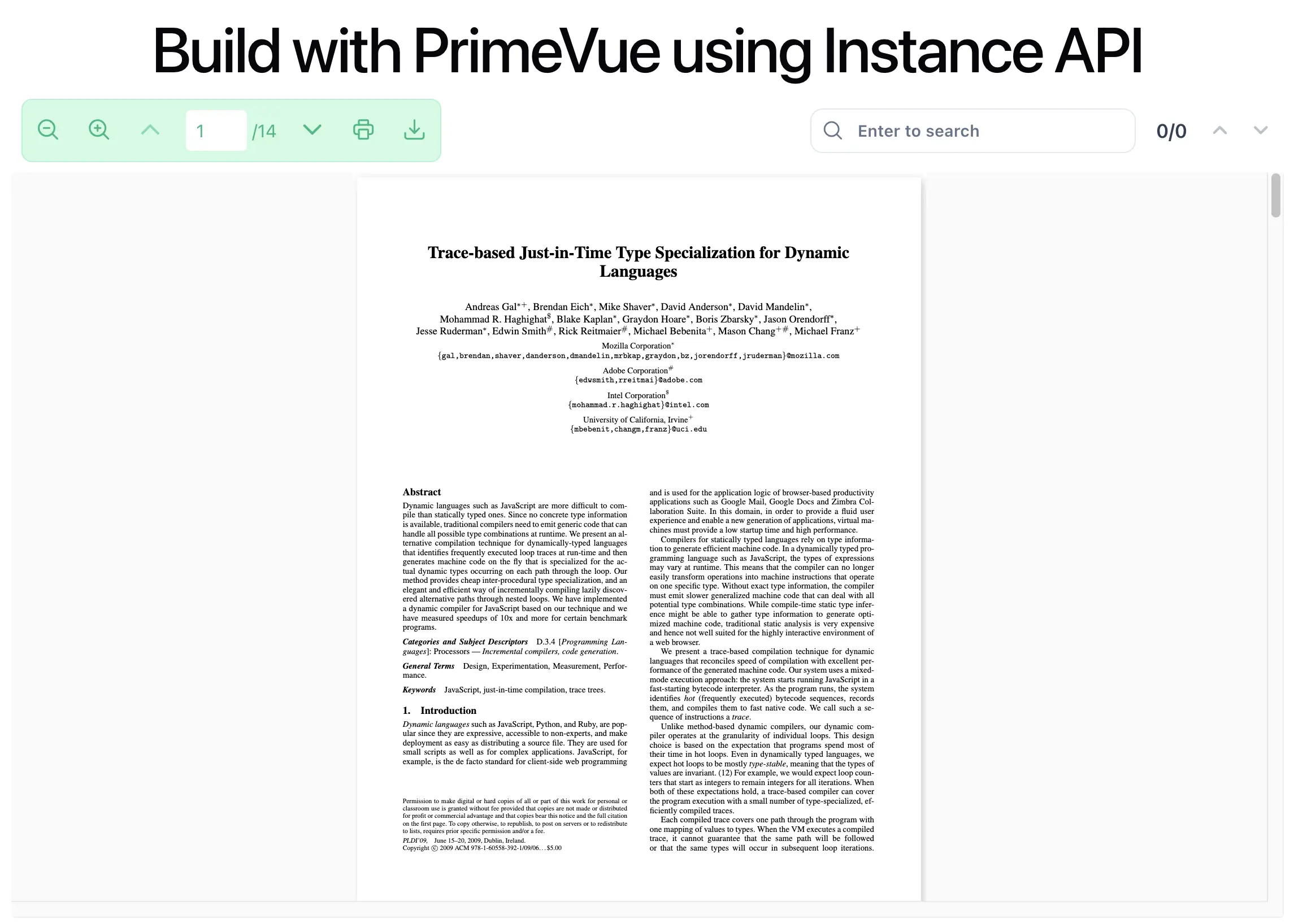
Notes
- Move to the Instance API approach when you need complete control over layout and interaction logic.
- Make sure
primeiconsis installed and its CSS is loaded in your app entry so classes likepi pi-searchrender correctly.